> ## Documentation Index
> Fetch the complete documentation index at: https://docs.mapxagent.com/llms.txt
> Use this file to discover all available pages before exploring further.

# Sharing maps, reports, and projects

> Share MapX work as an embeddable map, a live view, a high-resolution image, an HTML report link, or project access for a teammate.

Everything you can share in MapX is link- or token-based, and viewers never need a MapX account. The controls live in two places: the **Share** panel for maps, images, and people, and the **Reports** panel for report links.

| What you share | Where you create it | Who can open it |
| - | - | - |
| **Interactive map** (embed) | Share panel → **Embed** | Anyone with the link or iframe |
| **Live view** | REST API or `mapx` CLI | Anyone with the link |
| **Map image** | Share panel → **Social media share** | Anyone you send the file to |
| **HTML report** | Reports panel → **Copy share link** | Anyone with the link |
| **Project access** | Share panel → **Project share** | The teammates you invite |

## Open the Share panel

The **Share** tab sits in the workspace side rail, next to Layers, Data, and Analysis. It holds three collapsible sections: **Social media share**, **Embed**, and **Project share**.
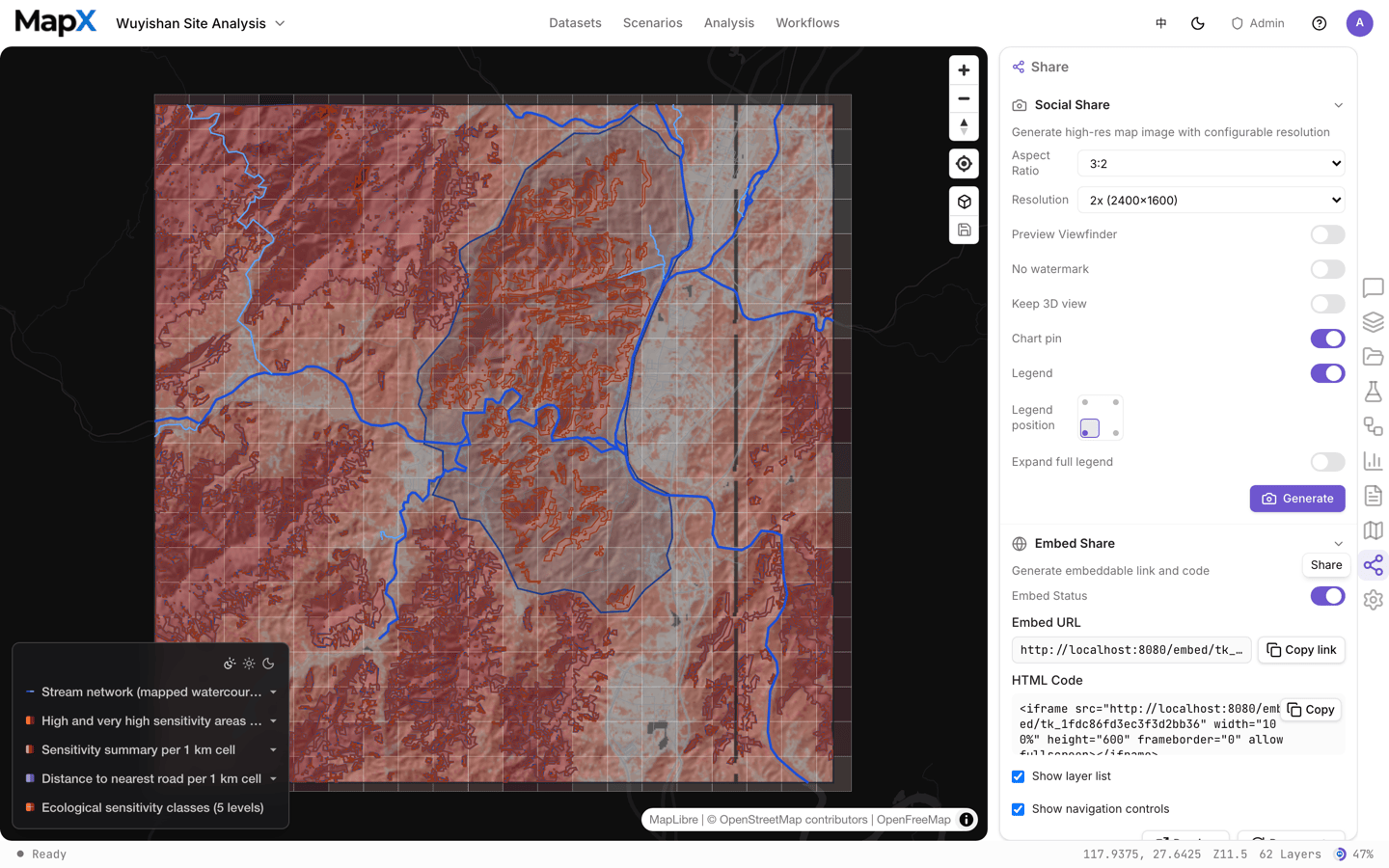
<img src="https://mintcdn.com/mapx/Gm8Sq4rHk_eRSOvo/images/sharing/share-panel.png?fit=max&auto=format&n=Gm8Sq4rHk_eRSOvo&q=85&s=56f25da73a4e00bfa7e732640249e6cd" alt="The Share panel with its three sections: social media share, embed, and project share" width="1440" height="900" data-path="images/sharing/share-panel.png" />

## Generate a share image

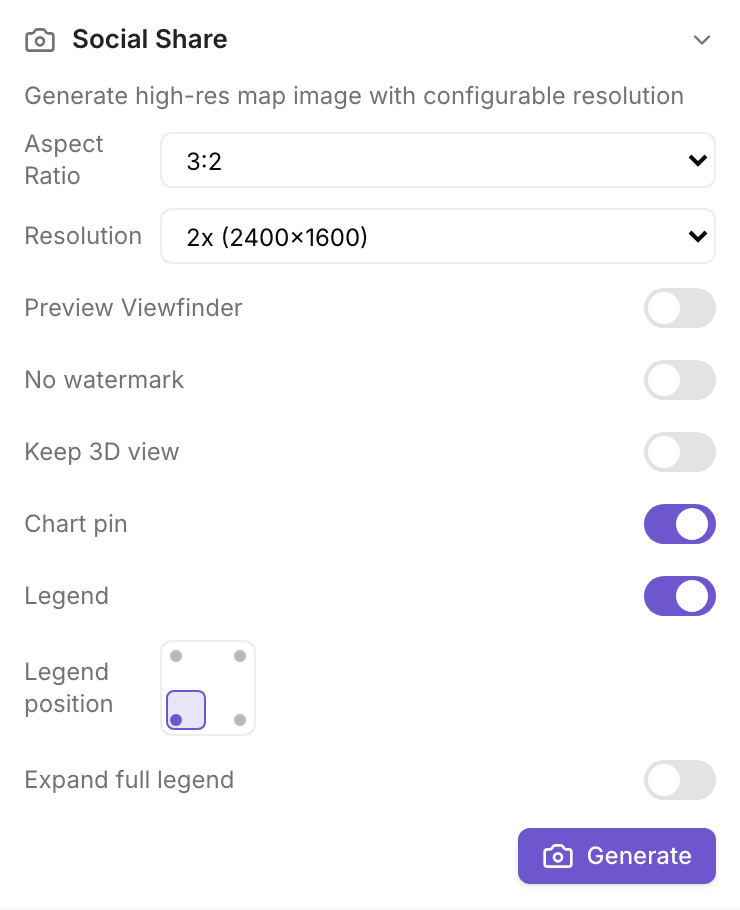
The image section renders the current map as a PNG you can post, paste into a deck, or attach to a report.

<Steps>
  <Step title="Pick an aspect ratio">
    Choose **3:2** (default), **16:9**, **4:3**, **1:1**, or **Auto** to follow your current viewport.
  </Step>

  <Step title="Pick a resolution">
    **1x**, **2x** (default), or **3x**. The label shows the exact pixel size derived from the viewfinder: a 1200 × 800 frame at 2x exports 2400 × 1600.
  </Step>

  <Step title="Turn on the preview viewfinder">
    **Preview viewfinder** draws the capture frame on the map. Pan and zoom so the frame covers what you want, then drag the legend inside the frame to place it.
  </Step>

  <Step title="Choose what the image contains">
    | Option | Effect |
    | - | - |
    | **No watermark** | Removes the MapX watermark. Available on Basic and above; Free plans always export with it |
    | **Keep 3D perspective** | Captures the tilted 3D camera instead of flattening to top-down |
    | **Pinned chart** | Draws the chart card pinned on the map into the image |
    | **Legend** + corner picker | Draws the legend and places it in one of the four corners |
  </Step>

  <Step title="Generate">
    **Generate** renders the image in your browser and downloads it as `mapx-<timestamp>.png`. Nothing is uploaded and no link is created — the file is yours.
  </Step>
</Steps>

<img src="https://mintcdn.com/mapx/Gm8Sq4rHk_eRSOvo/images/sharing/share-image.png?fit=max&auto=format&n=Gm8Sq4rHk_eRSOvo&q=85&s=9984b4e53d65e770c3e1d78381300ebd" alt="The image section of the Share panel: aspect ratio, resolution, and the options that decide what gets drawn" width="740" height="910" data-path="images/sharing/share-image.png" />

## Embed the map

Embedding publishes the project as a read-only interactive map for any website.

<Steps>
  <Step title="Turn embedding on">
    The status line shows **Embedding enabled** or **disabled**. While it is off, the embed URL renders nothing.
  </Step>

  <Step title="Copy the link or the iframe code">
    **Embed link** is the bare URL; **HTML code** is a ready-made `<iframe>` snippet with `width="100%"` and `height="600"`.
  </Step>

  <Step title="Decide what viewers can touch">
    **Show layer list** and **Show navigation controls** add or remove the layer list and the zoom/compass overlay in the embed. Both default to on, and toggling them changes the URL that gets copied.
  </Step>

  <Step title="Preview, then regenerate if needed">
    **Preview** opens the live embed. **Regenerate** issues a new token, which invalidates every previously copied link — use it when a link has leaked.
  </Step>
</Steps>

Embeds carry the project's theme colour and the author's map state, so a viewer sees the same styling you do. Viewers can pan, zoom, and inspect features; they cannot edit.

<img src="https://mintcdn.com/mapx/Gm8Sq4rHk_eRSOvo/images/sharing/share-embed.png?fit=max&auto=format&n=Gm8Sq4rHk_eRSOvo&q=85&s=8e305264b5bb3779b444cd2899b6055a" alt="The embed section: status, link, iframe code, viewer options, preview and token regeneration" width="740" height="716" data-path="images/sharing/share-embed.png" />

<Warning>
  Turning embedding off takes the map offline for everyone, including embeds already pasted into other sites. Regenerating the token does the same to the old link.
</Warning>

## Share a report link

Reports are shared from the **Reports** panel, not from the Share panel:

<Steps>
  <Step title="Open the Reports panel">
    Reports live in the workspace rail. Each row is one report revision.
  </Step>

  <Step title="Use the row menu">
    Open the row's **⋯** menu and choose **Copy share link**.
  </Step>

  <Step title="Send the link">
    The clipboard gets a URL that opens the report in any browser, with no MapX account.
  </Step>
</Steps>

Only **HTML** reports can be shared — Word and PowerPoint files are downloads, not links. Copying the link again reuses the token for that revision, so repeated clicks never pile up dead URLs.

<img src="https://mintcdn.com/mapx/Gm8Sq4rHk_eRSOvo/images/sharing/share-report-link.png?fit=max&auto=format&n=Gm8Sq4rHk_eRSOvo&q=85&s=89b038b7f1628c0badf9e8dbea856f36" alt="The Reports panel row menu with Copy share link" width="1440" height="900" data-path="images/sharing/share-report-link.png" />

## Live and static view URLs

The web UI produces an embed URL; the **REST API** and **mapx CLI** can also produce two view URLs for a project:

| URL | Behaviour |
| - | - |
| **Live view** | Opens the map and keeps it in sync — edits made in the project reach viewers as they happen |
| **Static view** | Opens the same read-only map without following later edits |

```bash theme={null}
mapx view live <session-id>      # prints the live view URL
mapx view static <session-id>    # prints the static view URL
```

See [mapx CLI](/en/developers/mapx-cli) and the [API reference](/en/developers/api-reference) for the endpoints and scopes.

## Invite someone to the project

**Project share** grants another MapX user access to the project itself, so they can open it from their own dashboard and keep working in it.

<Steps>
  <Step title="Enter their account email">
    Type the email address of an existing MapX user and choose **Share**.
  </Step>

  <Step title="Check the shared list">
    Everyone with access is listed under **Shared with**.
  </Step>

  <Step title="Remove access when the work is done">
    Use the remove button on a row to revoke that person's access immediately.
  </Step>
</Steps>

Project sharing is available on **Pro** and **Business**. On Free and Basic you can still share maps, images, and report links — none of those require the recipient to have a MapX account.

<img src="https://mintcdn.com/mapx/Gm8Sq4rHk_eRSOvo/images/sharing/share-project.png?fit=max&auto=format&n=Gm8Sq4rHk_eRSOvo&q=85&s=9c4da8aba0c43c577c9233ae9ba9140f" alt="The project share section: invite by email and the list of people with access" width="1440" height="900" data-path="images/sharing/share-project.png" />

## Revoking access

| To revoke | Do this |
| - | - |
| An embed link | Disable embedding, or regenerate the token |
| A live or static view URL | Regenerate the project's embed token — both URLs share it |
| A teammate's project access | Remove them from **Shared with** |
| A report link | Delete the report revision; a link always points at one revision |

## Related

* [Export](/en/sharing/exporting) — data files, charts, and report downloads
* [Reports](/en/concepts/reports) — build the report you want to share
* [Data security](/en/account/data-security) — how project data is isolated and who can reach it


This documentation is built and hosted on [Mintlify](https://mintlify.com), a developer documentation platform.